Your years left, in the menu bar.
A native Mac countdown that’s there while you work. Choose your text format, decimal places, colours and progress bar. Open at Login keeps it close.
 Life Years Left
See your years left. Give every week a little more meaning. Life Years Left keeps a quiet life countdown in your menu bar, with a calendar that puts your time in perspective.
macOS 13+ · Intel & Apple silicon · Your app life plan stays local
How many years might you have left? Get a simple estimate from published life tables, emailed to you and shown right here.
A rough population estimate. A date to reflect on, not a prediction of when you will die.
How the death clock estimate worksEstimated death date
A population average under published mortality rates. Your health, circumstances and future changes can make your lifespan very different. The calendar day is for a countdown, not day-level accuracy.
Keep the perspective on your MacTake the idea beyond a one-off death clock result. Keep your life countdown close, and see the weeks that make up your life.
A native Mac countdown that’s there while you work. Choose your text format, decimal places, colours and progress bar. Open at Login keeps it close.
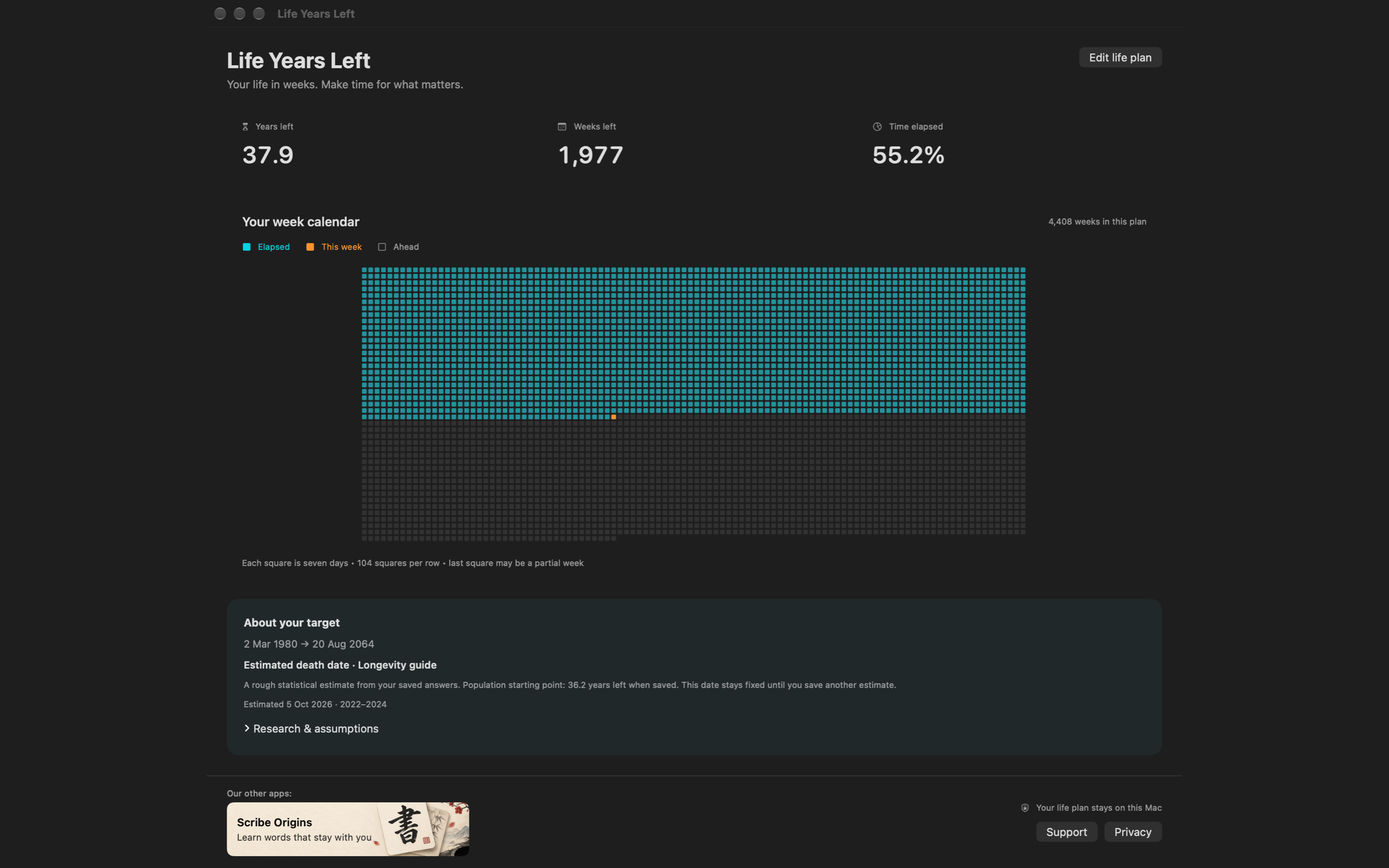
See elapsed weeks, this week and the weeks ahead in a life calendar. Your years and weeks left sit alongside it, so a distant date becomes something you can picture.
Set a target age, use an Australian or US population estimate, or count down between your own dates. The Longevity guide adds health, habit and outlook questions.
The online death clock calculator finds remaining life expectancy at your current age, using your birth date and the population table you choose. It interpolates between birthdays, then adds the remaining years to today’s date.
It doesn’t subtract your age from life expectancy at birth. If you choose both sex categories, it averages their remaining-years values equally.
These are period life tables: they assume the source period’s mortality rates continue. The website estimate doesn’t assess health, smoking, family history or lifestyle, and it doesn’t forecast future medical advances.
The Mac app’s Longevity guide offers a separate research-informed scenario using health, activity and wellbeing answers. The combined guide is not clinically validated as a personal death prediction. Its sources and assumptions are available in the app.
Use a death clock as a prompt to make time for what matters. A statistical date isn’t a deadline.
The homepage death clock uses population life tables only. These studies inform the Mac app’s separate Longevity guide. They describe associations in populations; they don’t validate an individual death date or our combined questionnaire.
A pooled analysis of 15 cohorts linked more daily steps with lower all-cause mortality, with the pattern varying by age. It doesn’t establish a fixed number of extra years for each walk.
Paluch et al. · Lancet Public Health ↗A review linked resistance training with lower mortality risk. Higher-volume effects remained uncertain. An association during follow-up isn’t a guaranteed lifespan increase.
Shailendra et al. · American Journal of Preventive Medicine ↗A UK Biobank study examined social connection and mortality, including visits with friends and family. Its findings don’t directly convert hours with friends into extra years of life.
Foster et al. · BMC Medicine ↗After accounting for health and other factors, the UK Million Women Study didn’t find an independent happiness effect on mortality in middle-aged women. Our app records happiness as context.
Liu et al. · The Lancet ↗Explore our “best of” guide, compare Mac and mobile apps, or understand what a life expectancy calculator can tell you.
Our guides are written by Guiix, the maker of Life Years Left, using official product descriptions. Recommendations are feature-based assessments from our perspective.
Your app dates, health answers and display settings stay in local preferences. No account is required for the calendar. The website only submits calculator details when you choose to email your estimate.
Read the privacy policyA death clock turns an estimated lifespan into a countdown. Life Years Left shows a rough estimated death date and time remaining, so you can think about how you spend your weeks. It cannot predict when an individual will die.
The free online calculator uses your birth date and an Australian or US male or female life table to find remaining life expectancy at your current age. It interpolates between birthdays and adds the remaining years to today’s date. The combined option averages the two published tables equally. It does not apply health or lifestyle adjustments.
A death clock is a rough statistical estimate, not a personal medical prediction. These period life tables assume the source period’s mortality rates continue. Health, circumstances, future changes and chance can make an individual’s lifespan very different. A calendar date is shown for the countdown, not because the estimate is precise to a day.
Choose “Email the result” to have your estimate sent to your inbox and displayed on this page. We keep your email and submission record. App release updates are a separate optional choice; requesting your estimate does not subscribe you to them. If the mail service cannot accept the email after your address is saved, we explain that and still display your estimate.
Life Years Left keeps a countdown in the Mac menu bar and shows a calendar of elapsed weeks, the current week and weeks ahead. Choose a target age, a population estimate, a custom date range or the Longevity guide. Display formats and colours are customisable, and Open at Login is available.
The website provides a simple population estimate. The Mac app adds a persistent menu bar countdown, a life calendar, custom targets and a Longevity guide with health, habit and outlook questions. The guide is a research-informed planning scenario, not a clinically validated medical prediction. Your app life plan and guide answers stay on your Mac.
The native app requires macOS 13 or later and supports Intel and Apple silicon Macs. The online death clock calculator works in a modern browser, including on phones and computers without the Mac app.
Life Years Left brings your death clock, menu bar countdown and life calendar together. Leave your email for the public Mac App Store release link.
Sign up for app release emails. Privacy policy · macOS 13+